Posts

ASP.NET ClientID Weirdness

I recently ran across something "funny" in ASP.NET. Not "ha ha" funny, but "hmm" funny. I had a page wherein I wanted to hide some of my server-side controls, but add an HTML button and a JavaScript function to make them visible when the button was clicked. Sounds simple enough, right? Of course, to access those server-side controls from JavaScript, I'd need their ClientIDs, which I embedded into my client-side script using server-side scripting tags (<% and %>). This worked like a charm -- when viewing the page source from my browser, the server-side tags had indeed been replaced with the appropriate ClientIDs. However, any attempt to access these controls using JavaScript's getElementById() function proved fruitless -- the function returned null for these controls. I turned on page tracing (using the Trace="true" option in the Page declaration) and verified these controls existed -- however, here's the funny part, and the...
How to Call Web Service Methods Asynchronously From an ASP.NET Page Using the Event-Driven Method in ASP.NET 2.0 and Higher

If you wanted to call a web service method asynchronously from an ASP.NET page in ASP.NET 1.x, you had two options: you could either use thread-blocking, or a callback method. With thread-blocking, you had to be mindful of the affect on other threads, and if you were using a callback method, you had to take steps to make sure that the page load didn't complete before the callback method was executed. In ASP.NET 2.0 and above, however, you have another option, which uses an event to signal that the asynchronous call has completed. It's easy, and even better, the page load won't complete until the event occurs. Here's how to use this convenient functionality. First, add the Async attribute to the Page directive that will be making the web service call, and set it's value to true, as shown below. This will allow the page to process asynchronously. <%@ Page Language="C#" Async="true" AutoEventWireup="true" CodeFile="Default.a...

Troubleshooting the "'Sys' is Undefined" Error When Using AJAX Extensions for ASP.NET

If you've put together some ASP.NET code that uses some of the AJAX extensions, but the code doesn't work and you get a client script error that states "'Sys' is undefined", you're not alone. I've experienced this error myself, and none of the stuff I found on the web concerning the error helped me out any. But I was able to resolve the problem, and here's how: I added the following lines to the httpHandlers section of my web.config file. <remove verb="*" path="*.asmx"/> <add verb="*" path="*.asmx" validate="false" type="System.Web.Script.Services.ScriptHandlerFactory, System.Web.Extensions, Version=1.0.61025.0, Culture=neutral, PublicKeyToken=31bf3856ad364e35"/> <add verb="*" path="*_AppService.axd" validate="false" type="System.Web.Script.Services.ScriptHandlerFactory, System.Web.Extensions, Version=1.0.61025.0, Culture=neutral, PublicK...

How to Use LINQ to Query a Collection of Objects in .NET 3.5

One of the cool new features in .NET 3.5 is LINQ , which stands for L anguage In tegrated Q uery. It allows you to use a syntax similar to SQL to query datasources, XML, and objects. In this posting, we will use a subset of LINQ called LINQ to Objects to query a collection of objects. Let's start with the class of object we'll be querying. For this example, we'll use a very simple class called Spaceship. Spaceship has two properties: Name, which is the name of the ship, and CrewCount, which is the number of crew members it has. It also overrides the ToString() method to return a string which gives the ship's name and crew count. Here's what the class looks like: (Shameless plug: the code samples in this post were formatted for HTML with my HTML Encoder program, which you can download here ) /// <summary> /// A class representing a spaceship /// </summary> class Spaceship {     private int miCrewCount;     private string msName;...

How to Get ASP.NET Apps To Run Under IIS7 in Windows Vista

Image
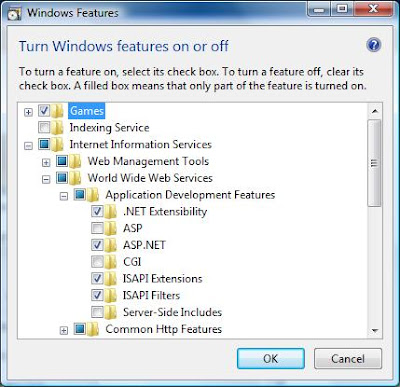
If you're trying to run an ASP.NET app under IIS7 in Windows Vista, you may receive a page informing you that "HTTP Error 404.3 - Not Found" has occurred. If so, here's what you have to do to correct the situation. 1. Click on what used to be the START button (the round button in the lower left hand corner of the screen with the Windows flag in it) and go to Control Panel . 2. If you are using the deafult view (the "Control Panel Home" text in the left pane will be highlighted), click on the Programs link. If you're using the classic view, double-click on Programs and Features . 3. Click on the Turn Windows Features On or Off link. 4. A security prompt will appear. Click Continue . 5. The Windows Features dialog will appear. Go to Internet Information Services->World Wide Web Services->Application Development Features and select ASP.NET . When you do, three other options will automatically be selected as well: .NET Extensibility, ISAPI Ext...

Extension Methods in C# 3.0

Image
The latest incarnations of the .NET languages include a slew of new features, and extension methods in C# is just one of them. Extension methods allow you to extend a class without subclassing it. You might be asking yourself "Why would I want to do that? Why not just subclass?" Well, what if the class you want to subclass is sealed , preventing you from subclassing it? Extension methods allow you to extend even sealed classes. Let's say you have a class called Dog. Dog has all of the properties and methods of a real dog, including a Bark() method. Because of the strained relationship in the neighborhood between cats and dogs, you want your dogs to be able to meow to help further the cause of cat/dog co-existence. There's just one problem: the Dog class is sealed and can't be subclassed. The answer lies with extension methods. First, create a static class. Extension methods must be part of a static class. Second, create a static member of the static cl...

How to Determine if a Column Exists in a DataReader

I recently had to work on something which required me to query a database, open the results in a DataReader, and check for the existence of a particular column. While the DataReader doesn't have a method to do this, with just a few steps I was able to accomplish this task. Here's how. First, the DataReader has a method named GetSchemaTable() , which returns a DataTable consisting of information regarding the data contained in the DataReader. The first column in this DataTable is named ColumnName , and its value is (obviously) the name of the column. Knowing this, we can loop through the rows in the DataTable, checking the ColumnName column for a value that equals the name of the column we're looking for. To this end, I wrote a static method in one of my classes which takes the DataReader and the name of the column being sought: (C#) public static bool HasColumn(DbDataReader Reader, string ColumnName) {    foreach (DataRow row in Reader.GetSchemaTable().Rows)  ...