Posts

Showing posts with the label IIS

How to Get ASP.NET 5 Apps To Run Under IIS

Recently I've been working on a web application using ASP.NET 5 and today had to deploy it to a web server in our test environment. Here are the steps I took to get this to work: Published the website project in Visual Studio 2015 by right-clicking on the project and selecting "Publish", I used the file system publish option, and specified the 64-bit version of the runtime we're using (in this case, 1.0.0-beta5). This is important, as I was unable to get IIS to host this website using the x86 version. I specified a path outside of the solution directory for the publish output. Inside the publish directory, the publish process created 2 folders -- approot and wwwroot, as well as a file called web (no extension), and web.cmd. On the web server, I created a new folder for the website. Inside this folder, I placed the output from the publish (the approot and wwroot folders and the two web files). I created a new website in IIS on the web server. For the app pool, I se...
Export and Import Server Package Options Not Appearing In IIS After Installing The Web Deployment Tool

I spent some time today learning about the Web Deployment Tool in Visual Studio 2010 and IIS, but despite having the tool installed wasn't getting the options to export or import packages in IIS. Finally, after much web-surfing, I stumbled across this excellent post which held the answer: if you install the tool via the Web Platform Installer, it doesn't install everything. The solution: either install it from the msi package to start, or, if you already have it installed, go into Programs and Features , right-click Web Deployment Tool , and select Change . Then, install the additional components you need (in my case, I selected everything that was not already installed). Alternatively, you could download the msi, run it, and select Change from the dialog when prompted; then choose any or all additional components. Many thanks to the author of the aforementioned blog post!

Automatic Virutal Directory Creation Failing in VS2010

One of the projects I work on involves a WCF service that is set up to run under IIS instead of the Visual Studio Development Server. This project has a couple of branches that from time to time are merged back into the trunk, which sometimes leads to the following error if the developer is prompted by Visual Studio to automatically create the virtual directory for the service to run under: Creation of the virtual directory (URL) failed with the error: The URL '(URL)' is already mapped to a different folder location. The reason this error occurs is because, based on which branch was being used when the file was committed to source control, the directory could be different. I figured this would be a pretty easy thing to fix -- just delete the virtual directory in question. But I was surprised to go into IIS Manager and find that...it wasn't there. Yet I could go to the URL in question and receive an error page that suggested that the URL was, in fact, valid. The fix was some...

Error Running a WCF Service Under IIS in Visual Studio 2010 and Windows 7

I was recently working on a WCF project in VS2010. Originally, the service was configured to run under the development server, but was later reconfigured to run under IIS -- but once this happened, it would fail when I'd try to start it up for debugging in the IDE, giving me the following error: The page you are requesting cannot be served because of the extension configuration. If the page is a script, add a handler. If the file should be downloaded, add a MIME map. To correct this issue, follow these steps (these steps apply to Windows 7 and may differ slightly depending on which version of Windows you're using): 1. Go to Control Panel 2. Select Add/Remove Programs 3. Select Turn Windows features on or off (from the left pane if you're using the modern view) 4. Go to Microsoft .NET Framework 3.5.1 (or something similar -- may very depending on your system). Expand this node and make sure the check boxes for any WCF options are checked. Then click OK. But wait, there...

How to Get ASP.NET Apps To Run Under IIS7 in Windows Vista

Image
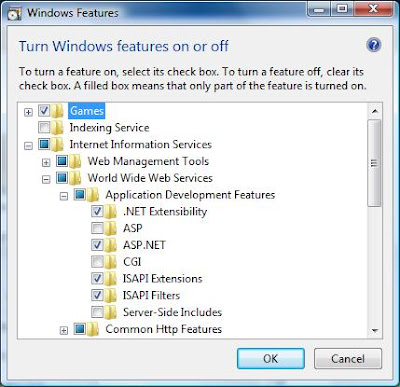
If you're trying to run an ASP.NET app under IIS7 in Windows Vista, you may receive a page informing you that "HTTP Error 404.3 - Not Found" has occurred. If so, here's what you have to do to correct the situation. 1. Click on what used to be the START button (the round button in the lower left hand corner of the screen with the Windows flag in it) and go to Control Panel . 2. If you are using the deafult view (the "Control Panel Home" text in the left pane will be highlighted), click on the Programs link. If you're using the classic view, double-click on Programs and Features . 3. Click on the Turn Windows Features On or Off link. 4. A security prompt will appear. Click Continue . 5. The Windows Features dialog will appear. Go to Internet Information Services->World Wide Web Services->Application Development Features and select ASP.NET . When you do, three other options will automatically be selected as well: .NET Extensibility, ISAPI Ext...