Posts

Showing posts with the label C#

"Arithmetic operation resulted in an overflow" Error When Retrieving Data From Oracle In .NET

I ran into this fun little exception today when calling a stored procedure in Oracle from some .NET code. The error message was "Arithmetic operation resulted in an overflow", and from what I was able to Google, it seemed like it was caused by a difference in precision between numeric data types in .NET and Oracle, or  by the need to compile the code in 32-bit mode. But in my case, neither was the cause. When one of our DBAs suggested I try the same code using the simple "SELECT 1 FROM DUAL" query, and the exception still  occurred, I began to look for other reasons. Fortunately, it was an easy fix. The cause of the problem was actually a setting on the DevArt OracleCommand object being used in the .NET code. Here is the offending line of code: command.FetchSize =  int .MaxValue; Removing this line of code corrected the problem.

Redirecting Assembly Versions in .NET

Image
As Kyle on South Park would say, "I learned something today." While working on one of our internal applications at work, I was getting the following exception: "System.IO.FileLoadException: Could not load file or assembly 'Microsoft.Practices.ServiceLocation, Version=1.0.0.0, Culture=neutral, PublicKeyToken=31bf3856ad364e35' or one of its dependencies. The located assembly's manifest definition does not match the assembly reference. (Exception from HRESULT: 0x80131040) File name: 'Microsoft.Practices.ServiceLocation, Version=1.0.0.0, Culture=neutral, PublicKeyToken=31bf3856ad364e35'" But the funny thing was that all instances of this assembly in the solution were using version 1.3, and not  1.0 as the exception states. In fact, I could find no reference to version 1.0 anywhere in the config files. I enabled assembly bind failure logging (by setting the registry value [HKLM\Software\Microsoft\Fusion!EnableLog] (DWORD) to 1), and was given ...

A Generic Method Using HttpClient to Make a Synchronous Get Request

A while back I wrote  a post  on how to make an HTTP Get request using the HttpWebRequest object in .NET, implemented in a Generic method. Last week I had two occasions during which to revisit this code, but using the HttpClient class introduced in .NET 4.5 instead. The code below is functionally similar to the code in my  earlier post , but uses HttpClient instead of HttpWebRequest. A few points of interest: The HttpClient. GetAsync() method  returns a Task that is executed asynchronously (hence the name), however, calling the  Result  property of that Task ensures that the asynchronous operation is complete before returning. By accessing it off of the GetAsync() return value as shown below, we are essentially blocking and changing the call into a synchronous one. The  EnsureSuccessStatusCode()  method of the HttpResponseMessage class will throw an exception of the response does not indicate success.          pub...

A Generic Method for Consuming Data From RESTful WCF Service Methods

I recently added some new methods to an existing RESTful WCF service and needed to consume these methods from an application which had not previously made use of this service. To make this easier, I created the following generic method. It could probably use a little refinement (specifically some code to handle what happens if an attempt is made to cast the service method result to an incorrect type), but it does the trick. using  System.IO; using  System.Net; using  System.Runtime.Serialization; using  System.Text; namespace  RESTService.Helpers {      public   static   class   RESTServiceHelpers     {          public   static  T GetResultFromRESTServiceMethod<T>( string  url)         {             HttpWebRequest request = (...

Using Reflection to Get the Value of a Nested Property

I recently ran into a situation wherein I needed to use reflection to get the value of a nested property. We were returning a custom type that inherits from JsonResponse, but this custom type is private to the controller class that uses it (I'm not sure why -- since we're returning it from some action methods I'd have thought it could be public. But I digress). When writing some unit tests for these methods, I wanted to check the value of the success property which just so happens to be nested within the Data property. So I wrote a little method to assist with this, as shown below (the method and class names have been changed to protect the innocent). The steps to follow are: Get the type of the object. Using the type, get the parent property of the nested property you want via Type.GetProperty(), specifying the name of the parent property as the parameter. Using the property, get its value using PropertyInfo.GetValue(), specifying the parent object and null as pa...

A Simple Method to Get an Object's Properties and Values at Runtime

I recently wrote some code to integrate with a WCF service authored by a different team and encountered an error, happening internal to the service, during my initial integration testing of one of the methods. I wanted to provide the developer on the other team with the parameters I passed into the method when the exception occurred, and one of those parameters was an object with more than a few properties. To that end, I wrote a quick method to provide the object's properties and their values so I could include it in the exception handling on my end and provide this info to the other developer to aid in debugging. This method requires a using statements for System.Reflection and System.Text. It could also be expanded a bit (for example, in the way it represents the value for property values that are objects), but as a quickly-written method it gets the job done. protected   string  GetObjectPropertiesAndValues( object  target) {      StringBuilder...

Unit Testing with a Mock Entity Framework DbContext and Fake DbSets

I'm a big fan of the Repository pattern, and use it hand-in-hand with dependency injection and the Query Object pattern. Lately I've been developing with Entity Framework, and using dependency injection to pass the DbContext instances into my repository classes. But one of the issues I ran into while trying to unit test one of my repository classes is that I couldn't figure out how to mock the DbSets that my DbContext exposes. I could create a mock of the DbContext, but was having trouble setting it up to return fake collections of entities. One of the problems is that DbSet has no constructor (it's created via a factory method). After much research and scouring of the web, here are the steps I learned to accomplish this.   Step One: Create a Fake DbSet Class That Implements IDbSet The DbContext exposes entities in DbSets. DbSet, in turn, implements the IDbSet interface. So we can create a class for use with our unit tests that, unlike DbSet, can be instantiated on ...

Possible Loss of Fraction in C#

I had written some code in C# to try to account for possible fractions that looked something like this: double columnCountDividedBy2 = numberOfColumns / 2; In the above example, numberOfColumns is declared as an int. I thought that, because I was assigning the result to a double, I would get a fractional number if numberOfColumns divided by 2 was not a whole number. However, what was happening was that the fraction was being dropped. ReSharper was also giving me a warning message, "possible loss of fraction". The reason why (which I have to smack myself now for not realizing) was that, even though I was assigning the result to a double, I was still dividing two integers . Adding a decimal point and zero to the second number of my equation, as shown below, solved the problem: double columnCountDividedBy2 = numberOfColumns / 2.0;

How To Easily Convert Strings to Mixed Case (aka Title Case, aka Proper Case) in C#

I found a very easy way to convert strings to mixed case (aka Title Case, aka Proper Case) in C# today. The String class does not have a method to do this, but the TextInfo class of the System.Globalization namespace does -- the ToTitleCase() method. An important thing to note is that it doesn't work on strings that are all upper case, so convert the string to lower case first to make it work. See the example below, where sTheStringYouWannaConvert represents the string you want to convert (go figure): string sMixedCaseString = System.Threading.Thread.CurrentThread.CurrentCulture.TextInfo.ToTitleCase(sTheStringYouWannaConvert.ToLower()); It's just that easy. :)

Easy TraceLogging In C#

The .NET Framework includes some convenient ways for tracing and debugging. In this post, I'll discuss how to easily add tracing functionality to your apps to output data to a text file. First, define a trace switch in your App.config file. This should be placed in the system.diagnostics node, and the point of the switch is to specify the level at which to output data with the switch. Here's an example: <system.diagnostics>   <!--   TRACE SWITCH VALUES   0 = Off   1 = Error   2 = Warning   3 = Info   4 = Verbose   -->   <switches>     <add name="MainTraceSwitch" value="4"/>   </switches> </system.diagnostics> There are five possible values: 0 = Off 1 = Error 2 = Warning 3 = Info 4 = Verbose So, if you set the value of your switch to 1, you're telling it that you only want to trace on errors. If you set it to 4, you're telling it to ...

Troubleshooting the "ORA-01036: illegal variable name/number" Error When Calling an Oracle Stored Procedure from .NET

Yesterday I had written some code in C# to call a stored procedure in an Oracle database, and when I began testing this code today, I was surprised to get the following error whenever the code would attempt to execute the OracleCommand: ORA-01036: illegal variable name/number I was scratching my head. Why wasn't this working? I've done this before! From previous experience, I knew that the names of the procedure parameters must match exactly when you add them to the OracleCommand object . In other words, if your stored procedure is expecting two parameters, named email and phonenumber , your code should look something like this: cmd.Parameters.Add("email", OracleType.VarChar); cmd.Parameters.Add("phonenumber", OracleType.VarChar); cmd.Parameters["email"].Value = psEmail; cmd.Parameters["phonenumber"].Value = psPhone; I checked the parameter names and I was already using the correct ones. What else was I missing? Then it dawned on me...

Using Nullable Value Types in .NET 2.0 and Higher

In .NET, there are two types of variables: value types and reference types. Values types are generally allocated on a thread's stack, whereas reference types are allocated from the managed heap, and have values which are the addresses of the memory location where the object resides. The default value of a reference type variable is null, but a value type can't be null -- it's default value will be a value that correspond's to the variable's type (for example, the default value of an int is zero). But what if you don't want a default value for a value type? In .NET 1.x, you're out of luck, but in .NET 2.0 and higher, you can use a nullable value type, made possible through the magic of generics. To create a nullable value-type variable, use the System.NUllable<T> generic type definition, where T is the type of variable you want to instantiate. For example, the following line creates a nullable integer type and assigns it a null value: System.Nullab...

How to Use LINQ to Query a Collection of Objects in .NET 3.5

One of the cool new features in .NET 3.5 is LINQ , which stands for L anguage In tegrated Q uery. It allows you to use a syntax similar to SQL to query datasources, XML, and objects. In this posting, we will use a subset of LINQ called LINQ to Objects to query a collection of objects. Let's start with the class of object we'll be querying. For this example, we'll use a very simple class called Spaceship. Spaceship has two properties: Name, which is the name of the ship, and CrewCount, which is the number of crew members it has. It also overrides the ToString() method to return a string which gives the ship's name and crew count. Here's what the class looks like: (Shameless plug: the code samples in this post were formatted for HTML with my HTML Encoder program, which you can download here ) /// <summary> /// A class representing a spaceship /// </summary> class Spaceship {     private int miCrewCount;     private string msName;...

Extension Methods in C# 3.0

Image
The latest incarnations of the .NET languages include a slew of new features, and extension methods in C# is just one of them. Extension methods allow you to extend a class without subclassing it. You might be asking yourself "Why would I want to do that? Why not just subclass?" Well, what if the class you want to subclass is sealed , preventing you from subclassing it? Extension methods allow you to extend even sealed classes. Let's say you have a class called Dog. Dog has all of the properties and methods of a real dog, including a Bark() method. Because of the strained relationship in the neighborhood between cats and dogs, you want your dogs to be able to meow to help further the cause of cat/dog co-existence. There's just one problem: the Dog class is sealed and can't be subclassed. The answer lies with extension methods. First, create a static class. Extension methods must be part of a static class. Second, create a static member of the static cl...

How to Determine if a Column Exists in a DataReader

I recently had to work on something which required me to query a database, open the results in a DataReader, and check for the existence of a particular column. While the DataReader doesn't have a method to do this, with just a few steps I was able to accomplish this task. Here's how. First, the DataReader has a method named GetSchemaTable() , which returns a DataTable consisting of information regarding the data contained in the DataReader. The first column in this DataTable is named ColumnName , and its value is (obviously) the name of the column. Knowing this, we can loop through the rows in the DataTable, checking the ColumnName column for a value that equals the name of the column we're looking for. To this end, I wrote a static method in one of my classes which takes the DataReader and the name of the column being sought: (C#) public static bool HasColumn(DbDataReader Reader, string ColumnName) {    foreach (DataRow row in Reader.GetSchemaTable().Rows)  ...

Design Patterns: Abstract Factory

The Abstract Factory pattern is defined as "A pattern which provides an interface for creating families of related or dependant objects without specifying their concrete classes." This is a pattern I'm currently making use of in one of the games I'm developing, Galactica 2180 , which is based on the old Battlestar Galactica TV show from the 1970's. Part of the game involves creating spaceships for each of the different factions in the game. It is in this regard that I'm making use of the Abstract Factory pattern. The game makes use of several engine objects to handle game dynamics: combat, diplomacy, production, etc. The production engine is responsible for queueing object requests by the different factions, such as spaceships, ground vehicles, and so on. But because each faction has their own types of these objects, a generic approach was needed. In this example, we will focus strictly on spaceship creation. For starters, I created an interface to be...

How To Determine What Properties An Object Has At Runtime With .NET Using Reflection

Image
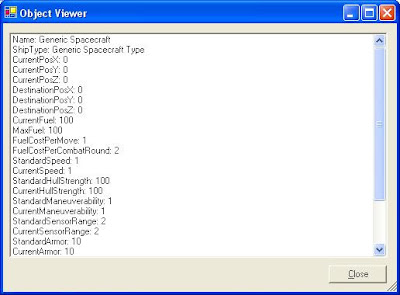
One of the neat things about the .NET Framework is the System.Reflection namespace. In Microsoft's words, it "contains classes and interfaces that provide a managed view of loaded types, methods, and fields, with the ability to dynamically create and invoke types." In other words, you can interact with and manipulate objects at runtime without having any foreknowledge of what the objects actually are. I'm currently working on two games in my spare time in which this functionality could come in handy. In particular, I'm developing a strategy game based on Battlestar Galactica (the original series, not the remake). The interface includes a star map where the player can view planetary systems and spacecraft. Part of the plan for the game is to allow the player to double-click on any of the ships which are visible on the map and be presented with a window displaying the ship's stats. However, all ships are not created equal: I have a Spacecraft base class, ...

TreeViews and Multi-Threaded Madness!

Disclaimer: The following information is for educational purposes only. Don't use at the track. I'm currently working on an app (in C#) that performs three, related tasks. Each of the tasks is performed by an object, and the app's main form has as member variables these three objects. The form also spawns three threads, one for each object, so the tasks can be performed simultaneously. The objects in turn have events, which are handled by the main form. These event handlers take care of, among other things, updating the controls on the form to display the status and progress of the various tasks. One of the controls is a TreeView. I ran into an interesting predicament a little while back when setting these event handlers up: when fired, the events could call the functions within the form class to remove nodes from the TreeView, or alter the text of the nodes, but when they tried to Add nodes, I received the following exception: "The action being performed on thi...

A C# IsNumeric Function

As much as I love the .NET Framework and C# (and VB.NET too), sometimes I just have to scratch my head and think "Why?" For example, why no InputBox() function in C# (click here for my custom C# InputBox class)? Also, why no IsNumeric() function in C#? VB has had one for years. So, I set out to write my own. My first inclination was simply to have a function that would attempt to convert a value from either an object or string to a numeric type, wrapped in a try block, and return false if an exception was caught. But as another developer pointed out to me, and as I experienced first hand, when the exception is thrown there is a noticable pause. A much better solution is to use the TryParse() method of the Double class. The TryParse method attempts to convert a value to a double, but instead of throwing an exception if the conversion fails, it simply returns false. This seems like enough right there, but the function takes an out parameter, so you need at least two li...

Simulating VB's App.PrevInstance in VB.NET and C#

Disclaimer: The following information is for educational uses only. Please do not use to leak classified information. Versions of Visual Basic prior to VB.NET had an App object (not to be confused with .NET's Application object) which exposed some useful functionality, including the PrevInstance function, which indicated whether or not a previous instance of the application was currently running. This function does not exist in VB.NET, but the functionality itself is present. This posting will show you how to use it, both in VB.NET and C#. To determine if a previous version of the application is running, we can use the Process object contained within the System.Diagnostics namespace. Specifically, the Process object's GetProcessesByName() method provides the functionality we need. Take a look at the C# code below (a using System.Diagnostics; declaration is implied): public int iGetProcessCount( string ProcessName ) {    Process[] proc = null;    try ...