Posts

Troubleshooting Database Connectivity Issues When Unit Testing With MSTest

I was attempting to run some unit tests today for an ASP.NET MVC project I'm working on when I ran into the following fun little exception: Test method BlogMVC.Tests.Controllers.HomeControllerTest.Index threw exception: System.Data.EntityException: The underlying provider failed on Open. ---> System.Data.SqlClient.SqlException: An attempt to attach an auto-named database for file C:\Users\Alan\Documents\Visual Studio 2010\Projects\BlogMVC\TestResults\Alan_QUIGON 2012-05-15 16_54_57\Out\BlogMVC.mdf failed. A database with the same name exists, or specified file cannot be opened, or it is located on UNC share. The issue is that each unit test is run in it's own individual directory, and in my case the unit tests needed my database files, which were not being deployed to the unit test directory. Fortunately this is easy to correct. To fix this issue, do the following: Right-click on the solution (not the project) and select "Add -> New Item". Choose ...
Using a View From a Different Controller in ASP.NET MVC

I'm currently working on a pet project in ASP.NET MVC: an MVC blog engine. I don't plan on using it to host my blog, but rather as an exercise in ASP.NET MVC. In my HomeController class, I want to retrieve the ten most recent blog posts and render them using the Index view for the BlogPost controller. This way, when a user navigates to the default page of the blog, they'll see a list of the most recent entires. But how could I use a BlogPost view (that isn't part of the Shared views folder) from within the HomeController class? To achieve this, I did the following in the Index() method of my HomeController class -- notice the line in bold (this is in MVC 3): public   ActionResult  Index() {     ViewBag.Message =  "My MVC-Powered Blog!" ;     BlogRepository  repo =  new   BlogRepository ();     BlogRepository . BlogPostCriteria  criteria =        ...

Finding Tables in SQL Server That Contain a Certain Column Name

Here's a query you can run in SQL Server to find tables containing a certain column name -- just replace "UserId" in the WHERE clause below with the text of the column name you're searching for: SELECT    t.name AS TableName,         SCHEMA_NAME(schema_id) AS SchemaName,         c.name AS ColumnName FROM    sys.tables AS t INNER JOIN sys.columns c ON t.OBJECT_ID = c.OBJECT_ID WHERE    c.name LIKE '%UserId%' -- Replace UserId with what you're looking for ORDER BY SchemaName, TableName; 

Finding and Correcting jQuery Version Conflicts

I recently ran into an issue with some new client-side code I'd developed. While everything worked correctly in the dev environment, upon deployment to the test environment I found that some of the jQuery functions were no longer being recognized. Going to the Console tab in Firebug, and entering "$().jquery" into the command prompt at the bottom, revealed the culprit: for some reason, despite my reference to jQuery 1.7.1, the page was now referencing version 1.4.2. The reason why was a part of the build process that occurs in our test environment and not our dev environment, which adds a reference to a minified 1.4.2 when built for the test environment (the pitfalls of differences between dev and test environments being a discussion for another time). One possible solution to correct this was to simply update the version of jQuery being used to 1.7.1, but there was understandable concern that doing so would impact (read: break) things. So I needed a safer solution. T...

The "CTRL + ," Shortcut In Visual Studio 2010

Image
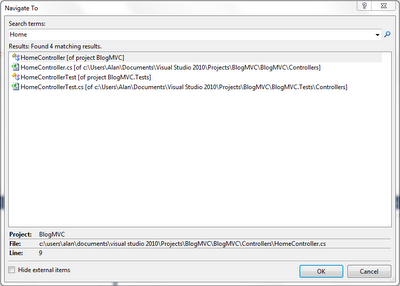
I'm currently working in a solution in Visual Studio 2010 that contains a whopping 46 projects, and even when I know where a certain file is located, it can often take awhile to just navigate to it. Fortunately, Visual Studio 2010 contains a great shortcut assist with this (it may also have been in earlier versions of Visual Studio, I'm not sure). Simply hit CTRL + , and Visual Studio will display a "Navigate To" window, which will allow you to enter text for what you're searching for (class name, file name, method name, etc) . Then, in the results list, double-click on the one you want to quickly navigate there. A huge time saver when you've got a lot of files in your project/solution. Here's a very simple example screenshot (click to enlarge):

How to Get the Working Directory of a WCF Service

I was working on some code today in a WCF service that required me to know the directory containing the service itself. This is one of those things that by the next time I need to do it, I'll be asking myself "How did I do that last time?" Well, here it is: System.Web.Hosting.HostingEnvironment.ApplicationPhysicalPath;

Video Game Review: Rocksmith

Image
I've been meaning to write this review for awhile, but life has been keeping me pretty busy lately. In fact, while I'd like to have spent more time playing this game, I haven't had much opportunity -- or energy -- of late. Rocksmith allows you to plug a real guitar into your PS3 or (in my case) Xbox 360 and play along to real songs (using a special cable included with the game -- plug one end into the guitar, the other into your gaming console). It adjusts the difficulty up or down depending on your skill (or lack thereof!) and no matter how badly you do, you can't fail out of a song as in games like Rock Band or Guitar Hero. When I first heard about this game, I was intrigued. But when I happened to come across it the day it came out, I was hesitant to purchase it. What if it didn't work well? What if the mechanics were off? I decided to hold off until reading some reviews. By the end of the day, a steady influx of glowing reviews had piled up on Amazon (the...