Posts

Finding and Correcting jQuery Version Conflicts

I recently ran into an issue with some new client-side code I'd developed. While everything worked correctly in the dev environment, upon deployment to the test environment I found that some of the jQuery functions were no longer being recognized. Going to the Console tab in Firebug, and entering "$().jquery" into the command prompt at the bottom, revealed the culprit: for some reason, despite my reference to jQuery 1.7.1, the page was now referencing version 1.4.2. The reason why was a part of the build process that occurs in our test environment and not our dev environment, which adds a reference to a minified 1.4.2 when built for the test environment (the pitfalls of differences between dev and test environments being a discussion for another time). One possible solution to correct this was to simply update the version of jQuery being used to 1.7.1, but there was understandable concern that doing so would impact (read: break) things. So I needed a safer solution. T...
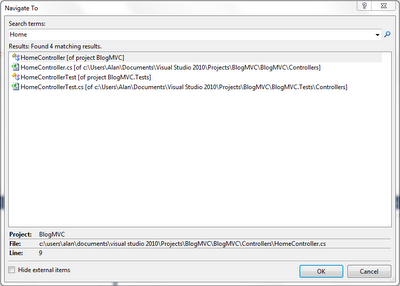
The "CTRL + ," Shortcut In Visual Studio 2010

Image
I'm currently working in a solution in Visual Studio 2010 that contains a whopping 46 projects, and even when I know where a certain file is located, it can often take awhile to just navigate to it. Fortunately, Visual Studio 2010 contains a great shortcut assist with this (it may also have been in earlier versions of Visual Studio, I'm not sure). Simply hit CTRL + , and Visual Studio will display a "Navigate To" window, which will allow you to enter text for what you're searching for (class name, file name, method name, etc) . Then, in the results list, double-click on the one you want to quickly navigate there. A huge time saver when you've got a lot of files in your project/solution. Here's a very simple example screenshot (click to enlarge):

How to Get the Working Directory of a WCF Service

I was working on some code today in a WCF service that required me to know the directory containing the service itself. This is one of those things that by the next time I need to do it, I'll be asking myself "How did I do that last time?" Well, here it is: System.Web.Hosting.HostingEnvironment.ApplicationPhysicalPath;

Video Game Review: Rocksmith

Image
I've been meaning to write this review for awhile, but life has been keeping me pretty busy lately. In fact, while I'd like to have spent more time playing this game, I haven't had much opportunity -- or energy -- of late. Rocksmith allows you to plug a real guitar into your PS3 or (in my case) Xbox 360 and play along to real songs (using a special cable included with the game -- plug one end into the guitar, the other into your gaming console). It adjusts the difficulty up or down depending on your skill (or lack thereof!) and no matter how badly you do, you can't fail out of a song as in games like Rock Band or Guitar Hero. When I first heard about this game, I was intrigued. But when I happened to come across it the day it came out, I was hesitant to purchase it. What if it didn't work well? What if the mechanics were off? I decided to hold off until reading some reviews. By the end of the day, a steady influx of glowing reviews had piled up on Amazon (the...

Entity Framework and the "Undefined column mapping" Exception

I've recently run across an exception that occurs while trying to update Entity Framework data models from their respective databases. The exception message is "Unable to generate the model because of the following exception: 'An error occurred while executing the command definition. See the inner exception for details. Undefined column mapping." I searched online and couldn't find any mention of this exception. This surprised me, considering the frequency with which I've been encountering it. I thought that perhaps it had something to do with the DbContext I'm using with Entity Framework 4.1 to create persistence ignorant POCO (plain old CLR object) classes. I tried a few things to alleviate the issue, but to no avail. As of now, the only solution I have to this problem is merely a workaround: delete all of the entities from the model and re-add them. I hope to eventually find a good solution to this problem, but with limited time and no other leads ...

Resolving the "Unable to load the specified metadata resource" Error When Using a Devart Entity Model

I recently made use of a Devart Entity Model to allow me to use LINQ with an Oracle database and to get around an issue when using views with Entity Framework 4.1. Everything worked well...until the code was deployed. When running on my local PC (either through Visual Studio or from another site under my local IIS) the code worked without a problem. But when built using our build machine, I would receive the "Unable to load the specified metadata resource" exception when trying to call a service method that made use of the entity model. When I used IL DASM (ildasm.exe) to examine the manifests of the assembly built locally versus the one built on the build machine, I found that, indeed, the resources for the Devart Entity Model were not present in the assembly manifest of the assembly that was built on the build machine. The solution -- and it's not a good solution -- was to install the Devart developer tools on the build machine. Again, this is not a good solution -- o...

Resolving a Problem When Adding A Reference to a WCF Service

Awhile ago, I was having issues adding a WCF service reference to a project I was working on. I was getting an error when trying to add the reference that said “Custom tool error: Failed to generate code for the service reference”. Looking at the Reference.cs file for the service, it was blank except for the comment block at the top. The answer lied in one of the warning messages (I've changed some of the assembly and namespace names below to protect my company's privacy): Custom tool warning: Cannot import wsdl:portType Detail: An exception was thrown while running a WSDL import extension: System.ServiceModel.Description.DataContractSerializerMessageContractImporter Error: List of referenced types contains more than one type with data contract name 'Content' in namespace 'http://www.mycompany.com/backoffice/core/services'. Need to exclude all but one of the following types. Only matching types can be valid references: "MyCompany.BackOffice.Core.Domain.Pack...