Posts

Design Patterns: Abstract Factory

The Abstract Factory pattern is defined as "A pattern which provides an interface for creating families of related or dependant objects without specifying their concrete classes." This is a pattern I'm currently making use of in one of the games I'm developing, Galactica 2180 , which is based on the old Battlestar Galactica TV show from the 1970's. Part of the game involves creating spaceships for each of the different factions in the game. It is in this regard that I'm making use of the Abstract Factory pattern. The game makes use of several engine objects to handle game dynamics: combat, diplomacy, production, etc. The production engine is responsible for queueing object requests by the different factions, such as spaceships, ground vehicles, and so on. But because each faction has their own types of these objects, a generic approach was needed. In this example, we will focus strictly on spaceship creation. For starters, I created an interface to be...
How To Determine What Properties An Object Has At Runtime With .NET Using Reflection

Image
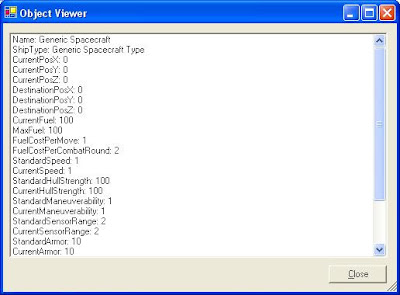
One of the neat things about the .NET Framework is the System.Reflection namespace. In Microsoft's words, it "contains classes and interfaces that provide a managed view of loaded types, methods, and fields, with the ability to dynamically create and invoke types." In other words, you can interact with and manipulate objects at runtime without having any foreknowledge of what the objects actually are. I'm currently working on two games in my spare time in which this functionality could come in handy. In particular, I'm developing a strategy game based on Battlestar Galactica (the original series, not the remake). The interface includes a star map where the player can view planetary systems and spacecraft. Part of the plan for the game is to allow the player to double-click on any of the ships which are visible on the map and be presented with a window displaying the ship's stats. However, all ships are not created equal: I have a Spacecraft base class, ...

How To Align Text in an ASP.NET TextBox

(This applies to the .NET Framework v1.1. I'm not sure if things have changed in v2.0. I recently needed to right-align the text in an ASP.NET TextBox control, but the control lacks any sort of text-alignment property. There are, however, two workarounds I found for this issue. The first is to simply add a style attribute to the control. This can be done as illustrated in the example code below, where txtKeyCode represents an ASP.NET TextBox (this is server-side code): txtKeyCode.Attributes.Add( "Style", "text-align: right;" ); The second workaround is more involved but offers more flexibility. It entails using a stylesheet and creating a style class, then assigning this class to the control. With this method, not only can you align the text, but you can also specify all sorts of other properties as you usually do in a stylesheet. This is demonstrated below: (In the stylesheet) .RightAlignedTextBox {    font-size: 12pt;    font-family: Arial;  ...

TreeViews and Multi-Threaded Madness!

Disclaimer: The following information is for educational purposes only. Don't use at the track. I'm currently working on an app (in C#) that performs three, related tasks. Each of the tasks is performed by an object, and the app's main form has as member variables these three objects. The form also spawns three threads, one for each object, so the tasks can be performed simultaneously. The objects in turn have events, which are handled by the main form. These event handlers take care of, among other things, updating the controls on the form to display the status and progress of the various tasks. One of the controls is a TreeView. I ran into an interesting predicament a little while back when setting these event handlers up: when fired, the events could call the functions within the form class to remove nodes from the TreeView, or alter the text of the nodes, but when they tried to Add nodes, I received the following exception: "The action being performed on thi...

A C# IsNumeric Function

As much as I love the .NET Framework and C# (and VB.NET too), sometimes I just have to scratch my head and think "Why?" For example, why no InputBox() function in C# (click here for my custom C# InputBox class)? Also, why no IsNumeric() function in C#? VB has had one for years. So, I set out to write my own. My first inclination was simply to have a function that would attempt to convert a value from either an object or string to a numeric type, wrapped in a try block, and return false if an exception was caught. But as another developer pointed out to me, and as I experienced first hand, when the exception is thrown there is a noticable pause. A much better solution is to use the TryParse() method of the Double class. The TryParse method attempts to convert a value to a double, but instead of throwing an exception if the conversion fails, it simply returns false. This seems like enough right there, but the function takes an out parameter, so you need at least two li...

Simulating VB's App.PrevInstance in VB.NET and C#

Disclaimer: The following information is for educational uses only. Please do not use to leak classified information. Versions of Visual Basic prior to VB.NET had an App object (not to be confused with .NET's Application object) which exposed some useful functionality, including the PrevInstance function, which indicated whether or not a previous instance of the application was currently running. This function does not exist in VB.NET, but the functionality itself is present. This posting will show you how to use it, both in VB.NET and C#. To determine if a previous version of the application is running, we can use the Process object contained within the System.Diagnostics namespace. Specifically, the Process object's GetProcessesByName() method provides the functionality we need. Take a look at the C# code below (a using System.Diagnostics; declaration is implied): public int iGetProcessCount( string ProcessName ) {    Process[] proc = null;    try ...

Loading an Image from an Embedded Resource in .NET

Disclaimer: The following information is for educational purposes only. Do not use to harass muppets. This is one of those things that I learned to do back when I first started learning .NET, but can never remember how to do when I need it, so I'm adding it here. Hopefully this will come in handy to someone. First, add an image to your project. You can do this by right-clicking on your project in the Solution Explorer and selecting Add->Add Existing Item , then browse for an image file using the dialog that appears. After the image has been added, click on it in the Solution Explorer and set its Build Action to Embedded Resource . Adding images to your project this way is useful for when you deploy your assembly -- it removes the need to distribute individual image files, instead embedding them into your assembly. Next, use the following line of code to load your image from the embedded resource (examples are given in both C# and VB.NET. Please note that the below examples...